Provide Spanish content for review
Add a Spanish version to an English staff request without changing notification routing.
Español · English edition
Audience: staff preparing content in Spanish or both languages. Availability: enabled on the configured staff forms that offer these controls. The staff interface and notification framing may remain English while the submitted publication text is Spanish.
Choose the content language
Use the form’s Language, Language Required or Spanish version needed? control. Choose Spanish or both languages, or answer Yes, when a Spanish version is required. Do not assume selecting a language automatically translates the English copy.
Supply the Spanish version
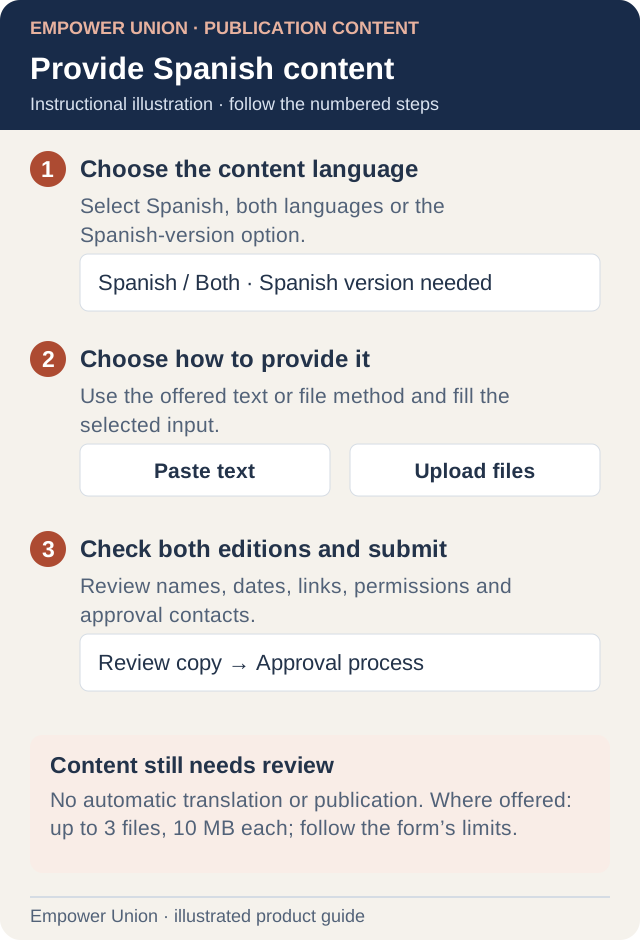
Illustration: No automatic translation or publication. Where offered: up to 3 files, 10 MB each; follow the form’s limits. Simplified workflow; follow the controls on your site. Open full-size illustration.
- Complete the ordinary request and its English fields as instructed.
- Select the language or Spanish-version choice.
- In How will you provide the Spanish version?, choose the offered paste-text or upload-file method.
- For text, enter the complete review copy in Spanish content for review. Blank or whitespace-only text does not satisfy a required content field.
- For upload, select the intended files in Spanish version file(s). Where these configured controls are offered, they accept up to three files, 10 MB each, using the supported JPG, PNG, PDF, Word or TXT formats. Follow any stricter limits on the actual screen.
- Confirm that the selected method contains the content. The other method is not a substitute when it is hidden or unselected.
- Review accents, names, dates, links, image permissions and consistency between editions.
- Complete sender and approval information, then submit once and retain the result.
An English-only request does not require a Spanish attachment just because the form supports one. If you change the language or method, review the currently visible required fields again before submitting.
Review and notification boundaries
Spanish content travels through the existing review workflow. It does not publish automatically, bypass approval, change recipients or translate the whole staff interface. Existing notifications can include an English-labelled Spanish-content section with text or named file links. A link is not a new email attachment and its access must still be checked by the authorized reviewer.
Supplying Spanish wording does not approve legal language. Keep legal notices, application agreements and policies in their separate review process. Do not replace an approved original with an unapproved translation.
If the conditional fields do not appear or validation continues, record the request type, language choice, selected method and visible error. Contact the reviewer or support without copying private submissions into the report.